Booking UX Mistakes That Cost Tour Operators First-Time Sales
Booking UX Mistakes That Cost Tour Operators First-Time Sales
December 22, 2025
First-time visitors decide within seconds whether they trust a booking website. Even if pricing, availability, and offers are competitive, poor booking UX can quietly push potential customers away before they ever reach the payment step.
Below are the most common booking UX mistakes that cost tour operators first-time sales-and what to do instead.
Making the Booking Process Feel Complicated
A long, confusing booking flow is one of the fastest ways to lose a new customer. Too many steps, unnecessary questions, or unclear progress indicators create friction and uncertainty.
Common issues:
Too many pages before checkout
Asking for information too early
No clear progress bar or “step” indicator
Better approach: Keep the booking flow short, logical, and predictable. Let customers see how many steps remain and only request essential information at each stage.
Hiding Prices or Adding Surprises Late
First-time customers are highly sensitive to price transparency. If fees, taxes, or add-ons appear unexpectedly at checkout, trust drops instantly.
Common issues:
Prices shown without taxes or fees
Mandatory add-ons revealed at the last step
Currency changes during checkout
Better approach: Show realistic pricing early. Make optional add-ons clearly optional, and keep totals consistent throughout the booking journey.
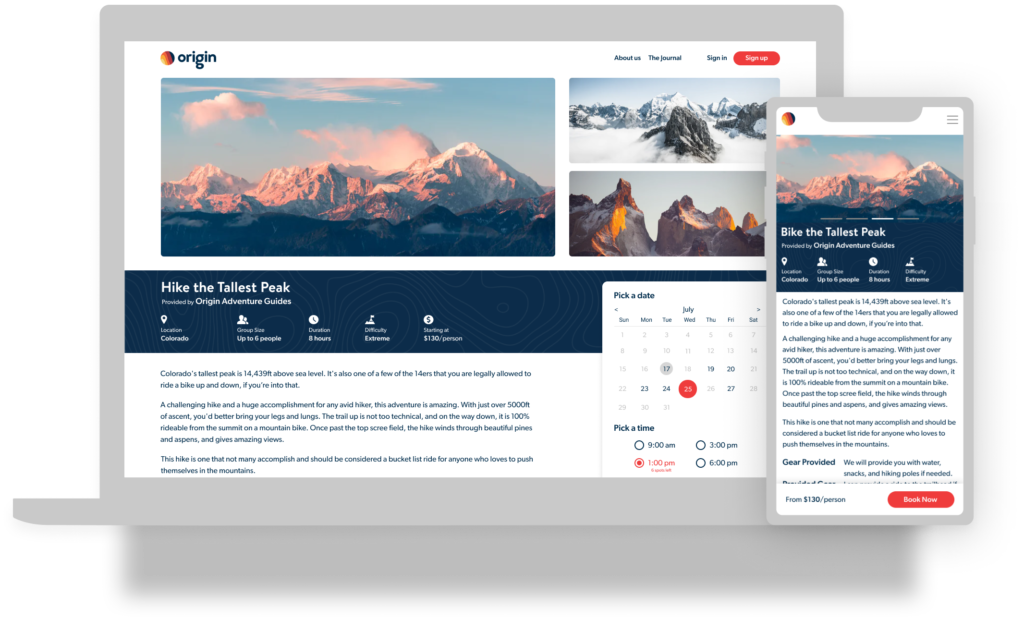
Poor Mobile Booking Experience
Many first-time visitors arrive from mobile-often from ads, social media, or search. If the booking flow isn’t mobile-friendly, conversions suffer immediately.
Common issues:
Forms that are hard to tap or scroll
Calendars that don’t work well on small screens
Slow loading pages on mobile networks
Better approach: Design booking flows mobile-first. Ensure buttons, date pickers, and forms are fast, readable, and easy to use on smaller screens.
Unclear Availability and Dates
Nothing frustrates a first-time visitor more than selecting dates only to discover availability rules later.
Common issues:
Blackout dates not clearly shown
Minimum stay or booking-in-advance rules revealed late
Confusing calendars
Better approach: Make availability rules visible upfront. Use clear calendars that immediately show what can and cannot be booked.
⚡ Faster Everywhere Enjoy faster page loads across the entire website, with major performance improvements on pricing and availability pages and noticeably better time to first byte, page rendering, and overall responsiveness-even on slower connections.
📱 Mobile-First by Design With nearly two-thirds of users booking on mobile, every page was built mobile-first and then optimized for desktop, featuring touch-friendly navigation, mobile-optimized forms and calendars, and cleaner layouts for smaller screens.
🛒 Streamlined Online Bookings The quote-to-booking flow has been reimagined to remove friction, with fewer steps from quote to confirmation, customer-entered passenger details, and cleaner transitions between pricing, review, and booking-an approach that has already shown a significant increase in online booking completion.
✍️ Built-In E-Signature Capture E-signature logic is now embedded directly into the booking flow, automatically capturing customer signatures, reducing manual follow-ups, and keeping confirmations and documentation consistent.
🎯 Simplified Specials & Offers The specials page has been redesigned to feel simple and stress-free, with a static, easy-to-read layout powered by real-time dynamic pricing in the background and a clear presentation that never overwhelms customers.
🗺️ Smarter Maps Integration Inspired by leading real estate platforms, maps have been redesigned to be more intuitive and useful, offering enhanced visual browsing, initial integration with a large ski-lift database, and a foundation for future map-based features.
🧠 User-Centric Design Decisions Design updates were driven by real user behavior data using analytics insights, resulting in clearer calls to action, improved destination and vendor pages, and layouts designed to guide-not distract-users.
🖼️ Better Images, Faster Loads A new image optimization service using modern image technology has been introduced, reducing image sizes by up to 90% while improving visual quality and delivering faster page loads without sacrificing design.
🎨 Easier Website Customization Website customization is now simpler and more flexible, requiring no HTML or template editing and offering dozens of visual controls inside Private Label settings inspired by the ease of Shopify-style customization.
SEO & UX Principles Behind the New Engine Every page now follows modern SEO and UX best practices, with fast-loading performance, long and engaging scroll-friendly layouts, clearly structured screen-sized sections, strong hero images at the top of key pages, and purposeful buttons and links throughout.
Smarter Quote & Inquiry Experience To reduce abandonment during quoting, the ideal flow is limited to just 2–3 steps, with additional products suggested after the initial quote, Google-powered auto-fill for customer details, minimal required input (name and email), and CRM-ready reports for automated follow-ups and sales tracking.
Forcing Account Creation Too Early
Requiring account creation before a customer understands the value of the booking is a conversion killer.
Common issues:
Mandatory sign-up before pricing
Account creation required before checkout
Complex password rules during first visit
Better approach: Allow guests to book first. Offer account creation after the booking is completed, when trust is already established.
Weak Trust Signals for First-Time Visitors
Returning customers may already trust the brand, but first-time visitors need reassurance.
Better approach: Clearly display cancellation policies, contact details, and secure payment indicators throughout the booking process.
Slow Loading Booking Pages
Speed matters more than most operators realize. A slow booking page increases abandonment-especially for new visitors.
Common issues:
Heavy images or scripts on booking pages
Slow availability or pricing refresh
Poor caching
Better approach: Optimize booking pages for speed and reliability. Every second saved improves trust and completion rates.
Not Explaining What Happens Next
First-time customers want reassurance after clicking “Book Now.”
Common issues:
No confirmation messaging
Unclear next steps
Delayed or confusing confirmation emails
Better approach: Clearly explain what happens after booking: confirmation timing, payment status, and where to find trip details.
Why First-Time UX Matters More Than You Think
First-time visitors don’t compare systems-they compare experiences. If booking feels confusing, slow, or risky, they won’t complain-they’ll simply leave and book elsewhere.
Fixing booking UX issues doesn’t just improve conversions-it builds trust that turns first-time visitors into repeat customers.


.png)
